

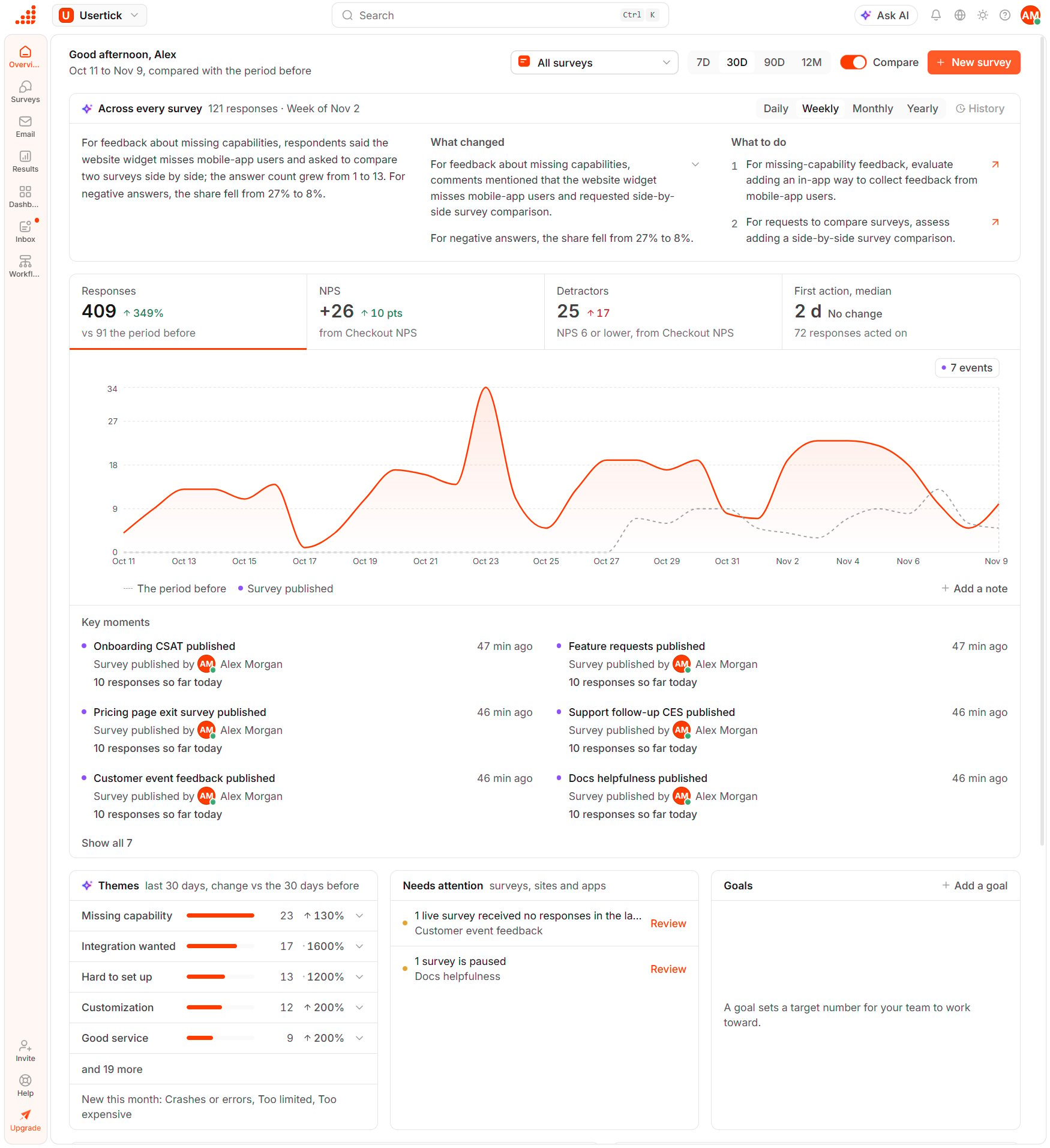
Overview
Choose what the page shows
The controls at the top apply to every number on the page:- All surveys narrows the page to one live or paused survey.
- 7D, 30D, 90D and 12M set the period, with days counted in your time zone.
- Compare adds the previous period to the chart and to the changes.
- New survey starts a survey. See Create a survey.
Read the AI reading
Across every survey sums up the responses of all your surveys for one closed period under What changed, What to do and Improve your surveys. The picker switches between Daily, Weekly, Monthly and Yearly readings, and History lists earlier readings, which you can search. A finding that names a theme selects that theme in the Themes card, and an action that names one opens the theme’s responses in the inbox. Usertick writes a reading only for a period with at least 30 responses. The reading runs on every plan and uses no AI credits. See About the AI reading.Follow a metric over time
The chart has four tabs:- Responses counts the responses received in the period.
- NPS shows the NPS of the selected survey or, while the page shows all surveys, of the first survey with an NPS question.
- Detractors counts answers of 6 or lower on that NPS question.
- First action, median measures the time from when a response arrives to its first status change, note or assignment.
Set a goal
The Goals card tracks up to 5 targets for the team.- In Goals, select Add a goal.
- Under Measure, select NPS, Responses or First action, median. For NPS, also select the Survey.
- Enter the Target, select the Due date and select Save goal.
Work through the cards
- Themes shows the themes mentioned most in the last 30 days, with the change against the 30 days before, and Open in Inbox lists a theme’s responses.
- Needs attention lists surveys with unpublished changes, live surveys with no responses in 7 days, paused surveys, website surveys without a site, sites not verified yet and connections that stopped working. Each row links to the fix.
- Open responses lists open responses with how long each one has waited. All or Me switches whose responses are listed, and you can use Assign to me and Resolve right in the card.
- Surveys shows the busiest live surveys with their responses in the last 7 days, the change, the last response and a 30-day trend.
- Coming up lists the next scheduled reports and email sends, the monthly counter reset and goals coming due, and the card hides when nothing is coming.